java基础笔记-注解

java基础 注解

0.注解认识

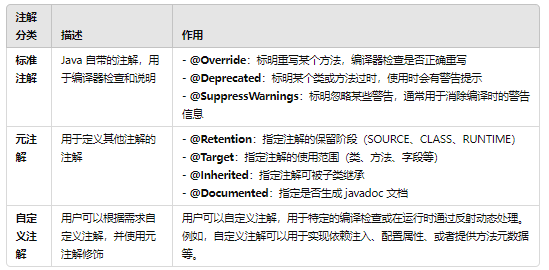
注解是JDK1.5版本开始引入的一个特性,用于对代码进行说明,可以对包、类、接口、字段、方法参数、局部变量等进行注解
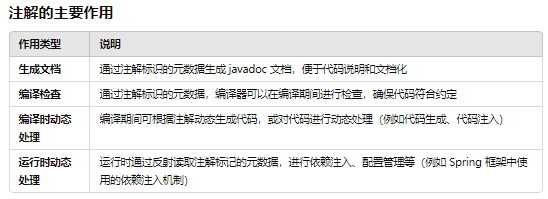
image-20241029144225973

注解分类

image-20241029144240709

java内置注解

1
2
3
4
5
6
7
8
9
10
11
12
13
14
15
16
17
18
19
20
21
22
23
24
25
26
27
28
29
30
31
32
33
34
35
36
37
38
39
40
41
42
43
44
45
46
47
48
49
50
public class testa {
class A{
public void print(){
System.out.println("A");
}
}
class b extends A
{
/**
* 重载父类的test方法
*/
@Override
public void print(){
System.out.println("B");
}
/**
* 被弃用的方法
*/
@Deprecated
public void print2(){
System.out.println("B2");
}

/**
* 忽略告警
*
* @return
*/
@SuppressWarnings("rawtype")
public void print3(){
System.out.println("B3");
}


}
void test(){
b b1=new b();
b1.print();
b1.print2();
}

public static void main(String[] args) {
// A a=new testa().new b();
testa t=new testa();
t.test();

}

}

Java 1.5开始自带的标准注解,包括@Override@Deprecated@SuppressWarnings

  • @Override:表示当前的方法定义将覆盖父类中的方法
  • @Deprecated:表示代码被弃用,如果使用了被@Deprecated注解的代码则编译器将发出警告
  • @SuppressWarnings:表示关闭编译器警告信息

我们再具体看下这几个内置注解,同时通过这几个内置注解中的元注解的定义来引出元注解


1.Override
1
2
3
4
5
6
7
@Target(ElementType.METHOD)
//修饰方法
@Retention(RetentionPolicy.SOURCE)
//编译适有效
public @interface Override {
}

告诉编译器被修饰的方法是重写的父类的中的相同签名的方法,编译器会对此做出检查,若发现父类中不存在这个方法或是存在的方法签名不同报错

2.Deprecated

弃用方法-只要不直接引用 字节码文件就不会生成他的

1
2
3
4
5
6
@Documented //文档
@Retention(RetentionPolicy.RUNTIME)//编译期
@Target(value={CONSTRUCTOR, FIELD, LOCAL_VARIABLE, METHOD, PACKAGE, PARAMETER, TYPE})//谁使用
public @interface Deprecated {
}

从它的定义我们可以知道,它会被文档化,能够保留到运行时,能够修饰构造方法、属性、局部变量、方法、包、参数、类型。这个注解的作用是告诉编译器被修饰的程序元素已被“废弃”,不再建议使用

3.SuppressWarnings
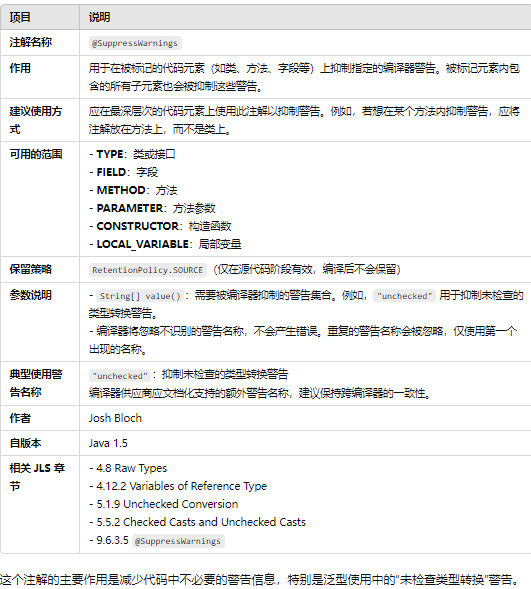
image-20241029145157922

参数 作用 原描述
all 抑制所有警告 to suppress all warnings
boxing 抑制装箱、拆箱操作时候的警告 to suppress warnings relative to boxing/unboxing operations
cast 抑制映射相关的警告 to suppress warnings relative to cast operations
dep-ann 抑制启用注释的警告 to suppress warnings relative to deprecated annotation
deprecation 抑制过期方法警告 to suppress warnings relative to deprecation
fallthrough 抑制确在switch中缺失breaks的警告 to suppress warnings relative to missing breaks in switch statements
finally 抑制finally模块没有返回的警告 to suppress warnings relative to finally block that don’t return
hiding 抑制与隐藏变数的区域变数相关的警告 to suppress warnings relative to locals that hide variable()
incomplete-switch 忽略没有完整的switch语句 to suppress warnings relative to missing entries in a switch statement (enum case)
nls 忽略非nls格式的字符 to suppress warnings relative to non-nls string literals
null 忽略对null的操作 to suppress warnings relative to null analysis
rawtype 使用generics时忽略没有指定相应的类型 to suppress warnings relative to un-specific types when using
restriction 抑制与使用不建议或禁止参照相关的警告 to suppress warnings relative to usage of discouraged or
serial 忽略在serializable类中没有声明serialVersionUID变量 to suppress warnings relative to missing serialVersionUID field for a serializable class
static-access 抑制不正确的静态访问方式警告 to suppress warnings relative to incorrect static access
synthetic-access 抑制子类没有按最优方法访问内部类的警告 to suppress warnings relative to unoptimized access from inner classes
unchecked 抑制没有进行类型检查操作的警告 to suppress warnings relative to unchecked operations
unqualified-field-access 抑制没有权限访问的域的警告 to suppress warnings relative to field access unqualified
unused 抑制没被使用过的代码的警告 to suppress warnings relative to unused code

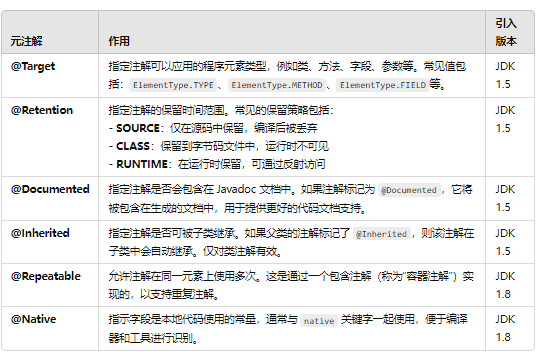
元注解

image-20241029145350197

这些元注解的使用为自定义注解提供了更加灵活和明确的行为控制。

1.@Target

Target注解用来说明那些被它所注解的注解类可修饰的对象范围:注解可以用于修饰 packages、types(类、接口、枚举、注解类)、类成员(方法、构造方法、成员变量、枚举值)、方法参数和本地变量(如循环变量、catch参数),在定义注解类时使用了@Target 能够更加清晰的知道它能够被用来修饰哪些对象,它的取值范围定义在ElementType 枚举中。


1
2
3
4
5
6
7
8
9
10
11
12
13
14
15
16
17
18
19
20
21
22
23
24
public enum ElementType {

TYPE, // 类、接口、枚举类

FIELD, // 成员变量(包括:枚举常量)

METHOD, // 成员方法

PARAMETER, // 方法参数

CONSTRUCTOR, // 构造方法

LOCAL_VARIABLE, // 局部变量

ANNOTATION_TYPE, // 注解类

PACKAGE, // 可用于修饰:包

TYPE_PARAMETER, // 类型参数,JDK 1.8 新增

TYPE_USE // 使用类型的任何地方,JDK 1.8 新增

}

2.@Retention & @RetentionTarget

Reteniton注解的作用是:描述注解保留的时间范围(即:被描述的注解在它所修饰的类中可以被保留到何时) 。

Reteniton注解用来限定那些被它所注解的注解类在注解到其他类上以后,可被保留到何时,一共有三种策略,定义在RetentionPolicy枚举中。

1
2
3
4
5
6
7
8
public enum RetentionPolicy {

SOURCE, // 源文件保留
CLASS, // 编译期保留,默认值
RUNTIME // 运行期保留,可通过反射去获取注解信息
}
------

3.@Documented

Documented注解的作用是:描述在使用 javadoc 工具为类生成帮助文档时是否要保留其注解信息。

以下代码在使用Javadoc工具可以生成@TestDocAnnotation注解信息。

1
2
3
4
5
6
7
8
9
10
11
12
import java.lang.annotation.Documented;
import java.lang.annotation.ElementType;
import java.lang.annotation.Target;

@Documented
@Target({ElementType.TYPE,ElementType.METHOD})
public @interface TestDocAnnotation {

public String value() default "default";
}
------

4.Inherited

Inherited注解的作用:被它修饰的Annotation将具有继承性。如果某个类使用了被@Inherited修饰的Annotation,则其子类将自动具有该注解。

1
2
3
4
5
6
7
8
@Inherited
@Retention(RetentionPolicy.RUNTIME)
@Target({ElementType.TYPE,ElementType.METHOD})
public @interface TestInheritedAnnotation {
String [] values();
int number();
}

1
2
3
4
5
6
7
8
9
10
11
12
13
14
15
@TestInheritedAnnotation(values = {"value"}, number = 10)
public class Person {
}

class Student extends Person{
@Test
public void test(){
Class clazz = Student.class;
Annotation[] annotations = clazz.getAnnotations();
for (Annotation annotation : annotations) {
System.out.println(annotation.toString());
}
}
}

1
xxxxxxx.TestInheritedAnnotation(values=[value], number=10)

即使Student类没有显示地被注解@TestInheritedAnnotation,但是它的父类Person被注解,而且@TestInheritedAnnotation@Inherited注解,因此Student类自动有了该注解


注解与反射接口

1.AnnotatedElement 探究

定义注解后,如何获取注解中的内容呢?反射包java.lang.reflect下的AnnotatedElement接口提供这些方法。这里注意:只有注解被定义为RUNTIME后,该注解才能是运行时可见,当class文件被装载时被保存在class文件中的Annotation才会被虚拟机读取。


1
2
3
4
public final class Class<T> implements java.io.Serializable,
GenericDeclaration,
Type,
AnnotatedElement

AnnotatedElement

AnnotatedElement 接口是所有程序元素(Class、Method和Constructor)的父接口,所以程序通过反射获取了某个类的AnnotatedElement对象之后,程序就可以调用该对象的方法来访问Annotation信息。


注解在 Java 中被视为一种特殊的接口,用于为代码提供元数据。它们本身并不是类,但可以使用 @interface 关键字定义,并在编译时生成相应的 .class 文件。因此,注解确实会生成类文件。

  1. 生成类:每个注解在编译时会生成一个对应的类文件,文件名为注解名加上 .class 后缀。
  2. 反射访问:注解可以通过反射机制访问。例如,可以使用 Class.getAnnotations() 方法获取类上定义的所有注解。通过 getAnnotation(Class<T> annotationClass) 方法可以获取特定类型的注解。
  3. 元数据:注解用于提供额外的信息,编译器、工具或者框架可以根据这些信息执行特定的逻辑。

1.判断该程序元素上是否包含指定类型的注解,存在则返回true,否则返回false。注意:此方法会忽略注解对应的注解容器。

1
2
3
default boolean isAnnotationPresent(Class<? extends Annotation> annotationClass) {
return getAnnotation(annotationClass) != null;
}

d9902b46848208dc9099f7186847c03e

调用 getAnnotation

2.返回该程序元素上存在的、指定类型的注解,如果该类型注解不存在,则返回null。

1
<T extends Annotation> T getAnnotation(Class<T> annotationClass);

3.返回该程序元素上存在的所有注解,若没有注解,返回长度为0的数组。

  • `Annotation[] getAnnotations()`
    
    1
    2
    3
    4
    5
    6
    7
    8
    9


    4.返回该程序元素上存在的、指定类型的注解数组。没有注解对应类型的注解时,返回长度为0的数组。该方法的调用者可以随意修改返回的数组,而不会对其他调用者返回的数组产生任何影响。`getAnnotationsByType`方法与 `getAnnotation`的区别在于,`getAnnotationsByType`会检测注解对应的重复注解容器。若程序元素为类,当前类上找不到注解,且该注解为可继承的,则会去父类上检测对应的注解。

    ------

    ![image-20241031142038651](https://raw.githubusercontent.com/Xlan-cell/tupian/master/image-20241031142038651.png)

    default <T extends Annotation> T[] getAnnotationsByType(Class<T> annotationClass) {}
    1
    2
    3

    5.返回直接存在于此元素上的所有注解。与此接口中的其他方法不同,该方法将忽略继承的注释。如果没有注释直接存在于此元素上,则返回null-

    default <T extends Annotation> T getDeclaredAnnotation(Class<T> annotationClass) {}
    1
    2
    3
    4
    5
    6
    7

    ![image-20241031142140052](https://raw.githubusercontent.com/Xlan-cell/tupian/master/image-20241031142140052.png)

    Inherited 不考虑继承注解

    6.返回直接存在于此元素上的所有注解。与此接口中的其他方法不同,该方法将忽略继承的注释

    default <T extends Annotation> T[] getDeclaredAnnotationsByType(Class<T> annotationClass) {}
    1
    2
    3
    4
    5
    6
    7
    8
    9
    10
    11
    12
    13
    14
    15
    16
    17
    18
    19
    20
    21
    22
    23
    24
    25
    26

    ![image-20241031142315880](https://raw.githubusercontent.com/Xlan-cell/tupian/master/image-20241031142315880.png)

    7.返回直接存在于此元素上的所有注解及注解对应的重复注解容器。与此接口中的其他方法不同,该方法将忽略继承的注解。如果没有注释直接存在于此元素上,则返回长度为零的一个数组。该方法的调用者可以随意修改返回的数组,而不会对其他调用者返回的数组产生任何影响。



    ![image-20241031142331860](https://raw.githubusercontent.com/Xlan-cell/tupian/master/image-20241031142331860.png)

    类->class->annotatedElement->实现注解的或者

    ##### 2.自定义注解

    当我们理解了内置注解, 元注解和获取注解的反射接口后,我们便可以开始自定义注解了。这个例子我把上述的知识点全部融入进来, 代码很简单:

    定义注解

    ```java
    @Target(ElementType.METHOD)
    @Retention(RetentionPolicy.RUNTIME)
    public @interface MyMethodAnnotation {
    public String title() default "";

    public String description() default "";
    }

类使用注解

1
2
3
4
5
6
7
8
9
10
11
12
13
14
15
16
17
18
19
20
21
22
23
public class TestMethodAnnotation {
@Override
@MyMethodAnnotation(title = "toStringMethod", description = "override toString method")
public String toString() {
return "Override toString method";
}

@Deprecated
@MyMethodAnnotation(title = "old static method", description = "deprecated old static method")
public static void oldMethod() {
System.out.println("old method, don't use it.");
}

@SuppressWarnings({"unchecked", "deprecation"})
@MyMethodAnnotation(title = "test method", description = "suppress warning static method")
public static void genericsTest() throws FileNotFoundException {
List l = new ArrayList();
l.add("abc");
oldMethod();
}

}

注解的获取实现定义

1
2
3
4
5
6
7
8
9
10
11
12
13
14
15
16
17
18
19
20
21
22
23
24
25
26
27
28
29
30
31
public class testa {
public static void main(String[] args) throws Exception {
/*
1.TestMethodAnnotation.class.getClassLoader().loadClass 获取类加载器加载类
2. Class.forName() ->forName()加载信息后->loadClass->类加载由双亲委派记者决定
*/
Method[] method = TestMethodAnnotation.class.getClassLoader().loadClass("TestMethodAnnotation").getMethods();

for (Method m:method)
{
//是否包含自定义注解
if (m.isAnnotationPresent(MyMethodAnnotation.class))
{
// 获取并遍历方法上的所有注解
for (Annotation a:m.getDeclaredAnnotations())
{
System.out.println("Annotation in Method '"
+ method + "' : " + a);
}

// 获取MyMethodAnnotation对象信息
MyMethodAnnotation methodAnno = m
.getAnnotation(MyMethodAnnotation.class);

System.out.println(methodAnno.title());

}
}

}
}

如上,我们可以获取该类所有方法上的注解,如果有我们写的注解,我们就可以进行注解功能的实现,注解解释注解

1
2
3
4
5
6
7
Annotation in Method '[Ljava.lang.reflect.Method;@5e2de80c' : @MyMethodAnnotation(title=toStringMethod, description=override toString method)
toStringMethod
Annotation in Method '[Ljava.lang.reflect.Method;@5e2de80c' : @MyMethodAnnotation(title=test method, description=suppress warning static method)
test method
Annotation in Method '[Ljava.lang.reflect.Method;@5e2de80c' : @java.lang.Deprecated()
Annotation in Method '[Ljava.lang.reflect.Method;@5e2de80c' : @MyMethodAnnotation(title=old static method, description=deprecated old static method)
old static method

深入理解注解

1.jav 8注解
  • ElementType.TYPE_PARAMETER

  • ElementType.TYPE_USE

ElementType.TYPE_USE(此类型包括类型声明和类型参数声明,是为了方便设计者进行类型检查)包含了ElementType.TYPE(类、接口(包括注解类型)和枚举的声明)和ElementType.TYPE_PARAMETER(类型参数声明), 不妨再看个例子


1
2
3
4
5
6
7
8
9
10
11
12
13
14
15
16
17
18
19
20
21
22
23
24
25
26
27
28
// 自定义ElementType.TYPE_PARAMETER注解
@Retention(RetentionPolicy.RUNTIME)
@Target(ElementType.TYPE_PARAMETER)
public @interface MyNotEmpty {
}

// 自定义ElementType.TYPE_USE注解
@Retention(RetentionPolicy.RUNTIME)
@Target(ElementType.TYPE_USE)
public @interface MyNotNull {
}

// 测试类
public class TypeParameterAndTypeUseAnnotation<@MyNotEmpty T>{

//使用TYPE_PARAMETER类型,会编译不通过
// public @MyNotEmpty T test(@MyNotEmpty T a){
// new ArrayList<@MyNotEmpty String>();
// return a;
// }

//使用TYPE_USE类型,编译通过
public @MyNotNull T test2(@MyNotNull T a){
new ArrayList<@MyNotNull String>();
return a;
}
}

2.注解支持继承吗

不能使用关键字extends来继承某个@interface,但注解在编译后,编译器会自动继承java.lang.annotation.Annotation接口.

虽然反编译后发现注解继承了Annotation接口,请记住,即使Java的接口可以实现多继承,但定义注解时依然无法使用extends关键字继承@interface。

区别于注解的继承,被注解的子类继承父类注解可以用@Inherited: 如果某个类使用了被@Inherited修饰的Annotation,则其子类将自动具有该注解


3.注解实现的原理

https://blog.csdn.net/qq_20009015/article/details/106038023

注解的应用场景

1.配置化到注解化
1
2
3
Spring 框架 配置化到注解化的转变。


2.继承实现到注解实现

Junit3到Junit4

一个模块的封装大多数人都是通过继承和组合等模式来实现的,但是如果结合注解将可以极大程度提高实现的优雅度(降低耦合度)。而Junit3 到Junit4的演化就是最好的一个例子。

3.Aop 注解

通过注解+AOP最终的目标是为了实现模块的解耦

权限管理

被 测试类

1
2
3
4
5
6
7
8
9
10
11
12
13
14
15
16
17
18
19
public class HelloWorld {

public void sayHello(){
System.out.println("hello....");
throw new NumberFormatException();
}

public void sayWorld(){
System.out.println("world....");
}

public String say(){
return "hello world!";
}

}
------
著作权归@pdai所有
原文链接:https://pdai.tech/md/java/basic/java-basic-x-annotation.html
  • Junit 3 实现UT

通过继承 TestCase来实现,初始化是通过Override父类方法来进行,测试方式通过test的前缀方法获取。

1
2
3
4
5
6
7
8
9
10
11
12
13
14
15
16
17
18
19
20
21
22
23
24
25
26
27
28
29
30
31
32
33
34
35
36
37
38
39
40
public class HelloWorldTest extends TestCase{
private HelloWorld hw;

@Override
protected void setUp() throws Exception {
super.setUp();
hw=new HelloWorld();
}

//1.测试没有返回值
public void testHello(){
try {
hw.sayHello();
} catch (Exception e) {
System.out.println("发生异常.....");
}

}
public void testWorld(){
hw.sayWorld();
}
//2.测试有返回值的方法
// 返回字符串
public void testSay(){
assertEquals("测试失败", hw.say(), "hello world!");
}
//返回对象
public void testObj(){
assertNull("测试对象不为空", null);
assertNotNull("测试对象为空",new String());
}
@Override
protected void tearDown() throws Exception {
super.tearDown();
hw=null;
}
}
------
著作权归@pdai所有
原文链接:https://pdai.tech/md/java/basic/java-basic-x-annotation.html
  • Junit 4 实现UT

通过定义@Before,@Test,@After等等注解来实现。

1
2
3
4
5
6
7
8
9
10
11
12
13
14
15
16
17
18
19
20
21
22
23
24
25
26
27
28
29
30
31
32
33
34
35
36
37
38
39
40
41
public class HelloWorldTest {
private HelloWorld hw;

@Before
public void setUp() {
hw = new HelloWorld();
}

@Test(expected=NumberFormatException.class)
// 1.测试没有返回值,有别于junit3的使用,更加方便
public void testHello() {
hw.sayHello();
}
@Test
public void testWorld() {
hw.sayWorld();
}

@Test
// 2.测试有返回值的方法
// 返回字符串
public void testSay() {
assertEquals("测试失败", hw.say(), "hello world!");
}

@Test
// 返回对象
public void testObj() {
assertNull("测试对象不为空", null);
assertNotNull("测试对象为空", new String());
}

@After
public void tearDown() throws Exception {
hw = null;
}

}
------
著作权归@pdai所有
原文链接:https://pdai.tech/md/java/basic/java-basic-x-annotation.html

JUnit4源码分析运行原理

https://blog.csdn.net/weixin_34043301/article/details/91799261


java基础笔记-注解
http://example.com/2024/10/28/java/java注解/java基础注解/
作者
John Doe
发布于
2024年10月28日
许可协议