音乐社区
全民歌推荐例子
5.音乐上传-上传服务- 修改为异步上传
5.音乐详情页 -freemarker mnio
7.音乐首页-由大数据推荐
不能太复杂-能想到的就现在这些功能了
前言 配环境崩溃了-直接卸载虚拟机了-一下所有技术栈默认环境配好
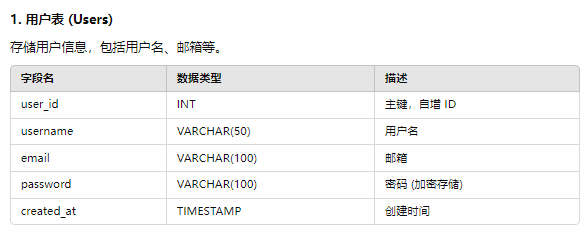
数据库设计 1.用户表
1
2
mysql> create table user ( userid varchar (255 ) primary key , username varchar (255 ) not null UNIQUE , password varchar (255 ) not null );0 rows affected (0.04 sec)
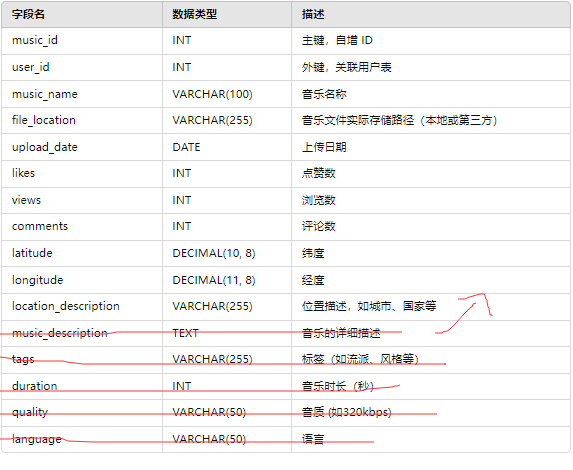
2.音乐表
1
2
3
mysql> create table Online_music ( music varchar(255 ) primary key, userid varchar (255 ) not null , music_name varchar (255 ) not null , file_location varchar (255 ) not null ,upload_date date not null ,likes int default 0 ,views int default 0 ,comments int default 0 ,latitude DECIMAL (10 , 8 ) not null ,longitude DECIMAL (11 , 8 ) not null );0 rows affected (0.02 sec)
ps:后续再说把
3.积分表-redis 计算每首歌的分值-
4.redis-音乐记录 包含点赞-浏览-评论
第四个是音乐播放需要
1 2 3 4 5 redisTemplate .opsForHash ().put ("onlineMusic:" + onlineMusic.getMusic (), OnlineMusicField.PLAY_COUNT.getFieldCode (), 0 );redisTemplate .opsForHash ().put ("onlineMusic:" + onlineMusic.getMusic (), OnlineMusicField.LIKE_COUNT.getFieldCode (), 0 );redisTemplate .opsForHash ().put ("onlineMusic:" + onlineMusic.getMusic (), OnlineMusicField.COMMENT_COUNT.getFieldCode (), 0 );redisTemplate .opsForHash ().put ("onlineFile:" + onlineMusic.getFileLocation (), OnlineMusicField.FILE_ID.getFieldCode (), onlineMusic.getMusic ());
我们是根据文件id直接进行的-
登录注册 登录注册
redis记录ip值判断是都超过安全阈值。设置有效期,有效期内超过多少多少就拦截掉
校验使用httpSesioon
利用redis锁-防止缓存击穿-
1 2 3 4 5 6 7 8 9 10 11 12 13 14 15 16 17 18 19 20 21 22 23 24 25 26 27 28 29 30 31 32 33 34 35 36 37 38 39 40 41 42 43 44 45 46 @Overridepublic R register(User user ) {if (user ==null ||user .getPassword().isEmpty()||user .getPassword().isEmpty())return R.error("请补全参数");Object o = redisTemplate.opsForValue().get (user .getUsername());if (o!=null )return R.error("账号已存在");create ();boolean isLock=loc.tryLock(3 , -1 , TimeUnit.SECONDS);if (isLock)int insert = this.baseMapper.insert (user );if (insert ==0 )return R.error("注册失败");set (user .getUsername(),user );Exception e)new BusinessException(500 ,"注册失败");if (loc != null && loc.isLocked()) {return R.success("注册成功");
音乐发布 技术方案
canal监听数据库-发送mq->同步es-
后续查询直接去es查询-也能够实现附加查询
配上userid+redis监控-不弄锁了
文件上传-异步实现
1.单实现 1 2 3 4 5 6 7 8 9 10 11 12 13 14 15 16 17 18 19 20 21 22 23 24 25 26 27 28 29 30 31 32 33 34 35 36 37 38 39 40 41 42 43 44 45 46 47 48 49 50 51 52 53 54 55 56 57 58 59 60 61 62 63 @Override public R upload (MultipartFile file, String musicName, BigDecimal latitude, BigDecimal longitudeString userId = (String ) RequestContextHolder .getRequestAttributes ().getAttribute ("userId" , RequestAttributes .SCOPE_REQUEST );OnlineMusic onlineMusic=new OnlineMusic ();if (file.isEmpty ()||musicName.isEmpty ()||latitude==null ||longitude==null )throw new BusinessException (500 ,"参数错误" );if (file.getSize ()>1024 *1024 *50 )throw new BusinessException (500 ,"文件过大" );String fileid=new String ();setMusicName (musicName);setLongitude (longitude);setLatitude (latitude);setUserid (userId);try {Future <String > future= fileupload (file);get ();catch (Exception e)throw new BusinessException (500 ,"文件上传失败" );if (fileid.isEmpty ())throw new BusinessException (500 ,"文件上传失败" );setFileLocation (fileid);return R.success (onlineMusic);private final ExecutorService executorService = Executors .newFixedThreadPool (10 ); private Future <String > fileupload (MultipartFile filereturn executorService.submit (() -> {try {Random random = new Random ();String uuid = String .valueOf (Math .abs (random.nextLong ())); Path destinationFile = Paths .get ("I:\\mp3\\" + uuid + "." + file.getContentType ().split ("/" )[1 ]);Files .copy (file.getInputStream (), destinationFile);return uuid;catch (Exception e) {throw new BusinessException (500 , "文件上传失败" );
音乐播放 疯狂read-看用本地还是数据库
只允许音乐文件上传-通过id-模糊去找
1 2 3 4 5 6 7 8 9 10 11 12 13 14 15 16 17 18 19 20 21 22 23 24 25 26 27 28 @Override public ResponseEntity<?> bofang(String id) {Path dir = Paths.get("I:\\mp3\\" );String pattern = id + "*" ; HttpHeaders headers = null ;InputStreamResource resource = null ;try {try (DirectoryStream<Path> stream = Files.newDirectoryStream(dir, pattern)) {if (iterator.hasNext()) {Path matchedFile = iterator.next();new HttpHeaders ();"audio/mpeg" ); new InputStreamResource (Files.newInputStream(matchedFile));catch (Exception e) {throw new BusinessException (500 , "文件不存在" );return ResponseEntity.ok()
仅仅完成了音乐播放的功能
bean开发
编写bean。注解后的参数就必须有,没有就直接返回参数错误,。每次判断为空太蠢了
第一次调试 1.注册接口调试 问题1 大部分基础架构来自第一个项目-
1 2 3 4 5 6 7 8 'userid' in 'field list' in com/anli02/mapper/UserMapper.java (best guess)'userid' in 'field list'
此错误表明数据库表 user 中不存在名为 userid 的列,但在SQL语句中却尝试插入该列的数据。
非常奇怪
1 2 3 @TableId (value = "userid" , type = IdType .ASSIGN_ID )private String userid;
userid varchar(255)
逆天问题,忘记改配置文件了
2.登录拦截器调试 1 2 sessionwebUserDto .set UserId(user .getUserid());to .set Username(user .getUsername());
下面代码刚刚也是setuserid
org.apache.catalina.session.StandardSessionFacade cannot be cast to com.anli02.entity.dto.SessionwebUserDto
1 SessionwebUserDto sessionwebUserDto = (SessionwebUserDto ) request.getSession().getAttribute("session_account" );
这里传递的是字符串->框架自动根据字符串找到保存再服务器的数据】
1 RequestContextHolder.currentRequestAttributes().set Attribute("user" , sessionwebUserDto , RequestAttributes.SCOPE_REQUEST);
3.上传文件接口 1 2 3 4 5 6 7 8 9 'userid' specified twicein com/anli02/mapper/OnlineMusicMapper.java (best guess)'userid' specified twice'userid' specified twice
1 2 @TableId (value = "userid" , type = IdType .ASSIGN_ID )private String music;
复制的时候忘记改了
1 2 3 4 5 6 7 ### Error updating database . Cause: java.sql .SQLException: Field 'upload_date' doesn't have a default value ### The error may exist in com/anli02/mapper/OnlineMusicMapper.java (best guess) ### The error may involve com.anli02.mapper.OnlineMusicMapper.insert-Inline ### The error occurred while setting parameters ### SQL: INSERT INTO online_music ( music, userid, music_name, file_location, latitude, longitude ) VALUES ( ?, ?, ?, ?, ?, ? ) ### Cause: java.sql.SQLException: Field ' upload_date' doesn' t have a default value 'upload_date' doesn't have a default value; nested exception is java.sql.SQLException: Field ' upload_date' doesn' t have a default value
忘记塞值了
逻辑
1 2 3 4 5 if (!q)BusinessException (500 ,"文件上传失败");
不是交接项目不写
完美完成
4.音乐播放调试 音乐播放修改 基础播放已经完成-我们现在-需要进行点赞-评论-
播放-redis+1
每天数据库进行同步-线程池-或者什么想干啥干啥-游标同步-根据日期进行同步-
1 redisTemplate .opsForHash().increment("onlineMusic:" + MusicId, OnlineMusicField.PLAY_COUNT.getFieldCode(),1 );
音乐上传修改 1 2 3 4 redisTemplate .opsForHash ().put ("onlineMusic:" + onlineMusic.getMusic (), OnlineMusicField.PLAY_COUNT.getFieldCode (), 0 );redisTemplate .opsForHash ().put ("onlineMusic:" + onlineMusic.getMusic (), OnlineMusicField.LIKE_COUNT.getFieldCode (), 0 );redisTemplate .opsForHash ().put ("onlineMusic:" + onlineMusic.getMusic (), OnlineMusicField.COMMENT_COUNT.getFieldCode (), 0 );redisTemplate .opsForHash ().put ("onlineFile:" + onlineMusic.getFileLocation (), OnlineMusicField.FILE_ID.getFieldCode (), onlineMusic.getMusic ());
ps:关于上传优化
我们可以提前生成uuid-然后直接异步-注意就不需要阻塞的等待上传了,就可以异步线程池了
10/11 代码要大改了——
上传修改 计算音乐热点 幻想时刻-kafka的环境已经搭建好了 直接使用即可
生产者-聚合-消费者
xxl-job->发送到redis
分时间切块
权重设计
浏览=1 点赞=5 评论=2
用户浏览点赞评论->生产者(有时间间隔-一般是多个浏览)->发送到聚合->进行分割好后->
音乐id -浏览人数
点赞id -点赞人数
总权重-或者单独权重
{
总权重-简单-后续只需要相加
分批次-消费者还要进行处理
}
选择分批次-这样后续才能es入库
…………………
->发送给消费者
消费者拿到数据->计算权重聚合->推荐热点分值增加
使用 Redis 的 ZSET(有序集合) 数据结构,其中音乐的 ID 作为成员,分值作为排序权重。
ZRANGE 或 ZREVRANGE 命令按分值排序后获取音乐列表
获取到这些音乐 ID 后,通过批量查询的方式从 Elasticsearch 中获取对应的音乐详细信息
还实现了附加查询
10/12 0.音乐热点代码 1.数据库设计 10/15 cancle+mq 1.配置cancle
mq定义
配置RabbitMQ连接
配置生产者
1 2 3 4 5 6 7 8 9 10 11 12 13 14 15 16 17 18 19 20 21 22 23 24 25 26 import sun.misc .Queue ;import javax.naming .Binding ;@Configuration public class RabbitMQConfig {@Bean public DirectExchage directExchage (return ExchangeBuilder .directExchage ("music" ).build ();@Bean public Queue directQueue (return new Queue ("direct.music" );@Bean public Binding bindingQueue (Queue directQueue ,DirectExchage directExchage return BindingBuilder .bind (directQueue).to (directExchage).wint ("music" );
生产者定义
@Service
public class OnlineMusicServiceImpl extends ServiceImpl<OnlineMusicMapper, OnlineMusic> implements IOnlineMusicService {
@Autowired
private RabbitTemplate rabbitTemplate;
消费者定义
发送到mq了
进行转json处理后
1 2 3 4 5 6 7 8 9 10 11 12 @Component class MusicConsumer @RabbitListener (queues="direct.music" )listen (String message)// 同步到es
es es同步
1 2 3 4 <dependency > <groupId > org.elasticsearch.client</groupId > <artifactId > elasticsearch-rest-high-level-client</artifactId > </dependency >
1 2 3 4 5 6 7 8 9 10 @Configuration class elsConfig @Bean return new RestHighLevelClient(RestClient.builder("http://192.168.150.101:9200" )
1 2 3 4 5 6 7 8 9 10 11 12 13 14 15 16 17 18 19 20 21 22 23 24 25 26 27 28 29 30 31 32 33 34 35 36 37 38 39 40 41 42 43 44 @Data public class OnlineMusicDoc implements Serializable {private static final long serialVersionUID = 1L ;@TableId(value = "music" , type = IdType.ASSIGN_ID) private String music;private String userid;private String musicName;private String fileLocation;private LocalDate uploadDate;private Integer likes;private Integer views;private Integer comments;private String location;public OnlineMusicDoc(OnlineMusic onlinemusic) {this .location = onlinemusic.getLatitude() + ", " + onlinemusic.getLongitude();this .music = onlinemusic.getMusic();this .userid = onlinemusic.getUserid();this .musicName = onlinemusic.getMusicName();this .fileLocation = onlinemusic.getFileLocation();this .uploadDate = onlinemusic.getUploadDate();this .likes = onlinemusic.getLikes();this .views = onlinemusic.getViews();this .comments = onlinemusic.getComments();
es类处理
1 2 3 4 5 6 7 8 9 10 11 12 13 14 15 16 17 18 19 20 21 22 23 24 25 26 27 28 29 30 31 32 33 34 35 @Component public class MusicConsumer @Autowired RestHighLevelClient client;@RabbitListener (queues="direct.music" )public void listen (String messageOnlineMusic onlineMusic=new OnlineMusic ();try {new ObjectMapper ().readValue (message, OnlineMusic .class );catch (Exception e)printStackTrace ();OnlineMusicDoc onlineMusicDoc=new OnlineMusicDoc (onlineMusic);IndexRequest request = new IndexRequest ("music" );id (onlineMusicDoc.getMusic ()); source (onlineMusicDoc, XContentType .JSON ));try {index (request,RequestOptions .DEFAULT );catch (Exception e)printStackTrace ();
合并-创建索引库
完成mq各类可靠性
.完成缓存预热。之后的工作。
10/16 数据库修改 1 2 3 4 5 6 7 8 9 10 mysql > alter table Online_music add introduce varchar(255 );Query OK , 0 rows affected (0.01 sec)Records : 0 Duplicates : 0 Warnings : 0 mysql > select *from Online_music ;1843906669077049345 | 1843897607711019010 | 我爱你 | 5553676743117756205 | 2024 -10 -09 | 0 | 0 | 0 | 29.56376100 | 106.55046400 | NULL |
introduce提供分词
算了.
已废弃-分词根据name分
索引库创建 1 2 3 4 5 6 7 8 9 10 11 12 13 14 15 16 17 18 19 20 21 22 23 24 25 26 27 28 29 30 31 32 33 34 35 36 37 PUT / online_music_index
music、 userid、 fileLocationkeyword 类型,适合不需要进行全文搜索的字段。
musicNametext 类型,并配置了标准分词器 analyzer: "standard",适合需要进行全文搜索的字段。
uploadDatedate 类型,并指定了日期格式 yyyy-MM-dd。
likes、 views、 commentsinteger 类型,表示整型数据。
mq生产者信息确认 1.开启生产者重试机制 1 2 3 4 5 6 7 8 9 10 springamqp 提供信息发送重试机制->类似三次握手 spring: rabbitmq: connection-timeout: 1s template: retry: enabled: true initial-interval: 1000ms multiplier: 1 max-attempts: 3
2.生产者确认机制 生产者确认机制
1 2 3 4 5 6 7 8 9 spring:confirm -type : correlated # 开启publisher confirm 机制,并设置confirm 类型return 机制confirm -type 有三种模式可选:confirm 机制
1 2 3 4 5 6 7 8 9 10 11 12 13 14 15 16 17 18 19 20 21 22 23 24 25 CorrelationData cd = new CorrelationData ();getFuture ().addCallback (new ListenableFutureCallback <CorrelationData .Confirm >()@Override public void onFailure (Throwable throwableprintStackTrace ();@Override public void onSuccess (CorrelationData .Confirm confirmif (confirm.isAck ())System .out .println ("消息发送成功" );else System .out .println ("消息发送失败" );send ( HotArticleConstants .HOT_ARTICLE_AGGREGATION_QUEUE ,mess,cd);
可以把cd提出来
mq可靠性 去控制台给交换机持久化
设置队列懒人化
1 2 3 4 5 6 7 8 @Bean public Queue directQueue (Map <String , Object > args = new HashMap <>();put ("x-queue-mode" , "lazy" ); return new Queue ("direct.music" , true , false , false , args);
控制台开启信息持久化
消费者可靠性 消费者确认机制 SpringAMQP利用AOP对我们的消息处理逻辑做了环绕增强,当业务正常执行时则自动返回ack. 当业务出现异常时,根据异常判断返回不同结果:
SpringAMQP利用AOP对我们的消息处理逻辑做了环绕增强,当业务正常执行时则自动返回ack. 当业务出现异常时,根据异常判断返回不同结果:
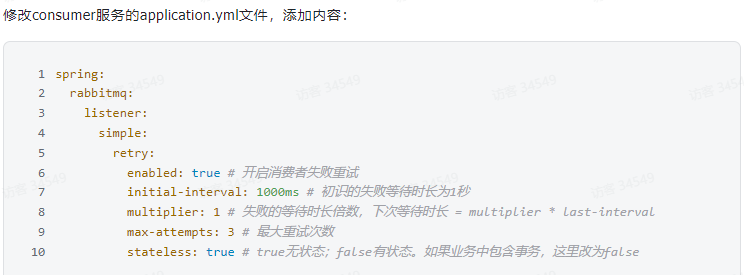
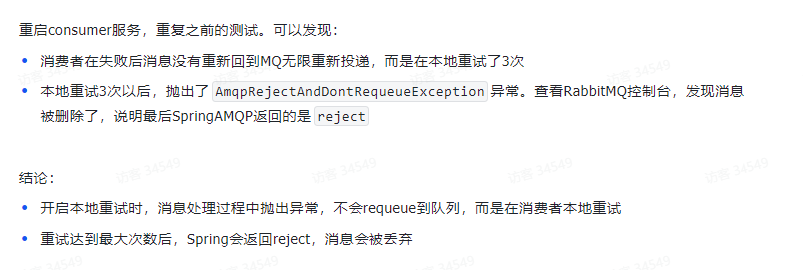
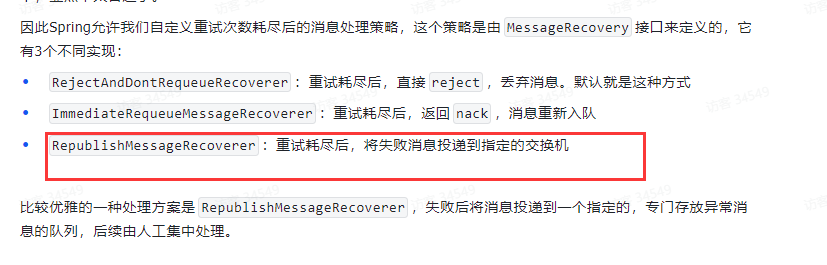
失败者重试机制 失败重试机制消费者->重试->出现异常->返回mq 一直下去-消耗资源- 在消费者出现异常时->利用本地重试-不到mq队列
重试投递 失败交换机
1 2 3 4 5 6 7 8 9 10 11 12 13 14 15 16 17 18 19 20 21 22 23 24 25 26 27 @Configuration public class ExchageMQ {@Bean public DirectExchange directExchage (return new DirectExchange ("erro.direct" );@Bean public Queue erroqueue (return new Queue ("erro.queue" ,true );@Bean public Binding bindingQueue (Queue erroqueue , DirectExchange directExchage return BindingBuilder .bind (erroqueue).to (directExchage).with ("erro.key" );@Bean public MessageRecoverer messageRecoverer (RabbitTemplate rabbitTemplatereturn new RepublishMessageRecoverer (rabbitTemplate,"erro.direct" ,"erro.key" );
在 RabbitListenerContainerFactory 中配置重试机制,指定重试次数和重试间隔。
1 2 3 4 5 6 7 8 9 10 11 12 13 14 15 16 17 18 19 20 21 22 23 24 25 26 27 28 29 30 31 32 @Configuration public class RabbitMQRetryConfig {@Bean public SimpleRabbitListenerContainerFactory rabbitListenerContainerFactory (ConnectionFactory connectionFactory) {SimpleRabbitListenerContainerFactory factory = new SimpleRabbitListenerContainerFactory ();return factory;@Bean public RetryTemplate retryTemplate () {RetryTemplate retryTemplate = new RetryTemplate ();SimpleRetryPolicy retryPolicy = new SimpleRetryPolicy ();5 ); new FixedBackOffPolicy () {2000 ); return retryTemplate;
业务幂等性 多次发送-同意的id-对吧-发送了没事情
我们假设有幂等性问题
信息加入id
1 2 3 4 5 6 7 8 9 10 11 @Configuration public class messageConverterto {@Bean public Jackson2JsonMessageConverter methodConverter (Jackson2JsonMessageConverter jjmc=new Jackson2JsonMessageConverter ();setCreateMessageIds (true );return jjmc;
1 2 3 4 5 6 7 8 9 10 11 12 13 private static final Set <String > processedMessageIds = new HashSet <>();@RabbitListener (queues="direct.music" )public void listen (Message messageString messageId = message.getMessageProperties ().getMessageId ();if (messageId != null && processedMessageIds.contains (messageId)) {System .out .println ("重复消息,已跳过处理:" + messageId);return ;
虽然 Jackson2JsonMessageConverter 可以为每条消息生成唯一的 MessageId,但是为了确保幂等性,还需要在消息消费者侧做以下工作:
检查是否已处理过该 MessageId。
记录处理过的消息 ID,防止重复处理。
热点数据续 reids设计
id 配和分值
sorted sets-key value(id) value(分值)
1 2 3 4 5 6 7 8 9 10 11 12 13 14 15 16 17 18 19 20 21 22 23 24 25 26 27 28 29 30 31 32 33 34 35 36 37 38 39 40 41 42 43 44 45 46 47 public class ArticleIncrHandleListener {@Autowired RedisTemplate redisTemplate;@Autowired RestHighLevelClient restHighLevelClient;@KafkaListener (topics = HotArticleConstants .HOT_ARTICLE_CONSUMER_QUEUE )public void handle (String messageArticleVisitStreamMess mess= JSON .parseObject (message, ArticleVisitStreamMess .class );savemess (mess);info ("收到消息:{}" , message);private void savemess (ArticleVisitStreamMess messgetLike ()*5 +mess.getComment ()*2 +mess.getView ();opsForZSet ().add (HotArticleConstants .HOT_ARTICLE_REDIS_QUEUE ,mess.getMuicid (),score);UpdateRequest updateRquest=new UpdateRequest ();index ("online_music_index" ).id (mess.getMuicid ()).doc (mess);Map <String , Object > params = new HashMap <>();put ("view" , mess.getView ());put ("comment" , mess.getComment ());put ("like" , mess.getLike ());Script script = new Script (ScriptType .INLINE , "painless" ,"ctx._source.comments += params.comment;" +"ctx._source.views += params.view;" +"ctx._source.likes += params.like;" ,script (script);try {update (updateRquest, RequestOptions .DEFAULT );catch (Exception e) {printStackTrace ();
展示编写 两个搜索 一个根据ids查询所有数据返回
另外一个就是带坐标的搜索
后端就返回个集合就可以了 json
1 2 3 4 5 6 7 8 GET /your_index/_search"query" : {"ids" : {"values" : ["1" , "4" , "100" ]
1 2 3 4 5 6 7 8 9 10 11 12 13 14 15 16 17 18 19 20 21 22 23 24 25 26 27 28 29 30 31 32 33 34 35 36 37 38 39 40 41 42 43 44 45 46 47 48 49 50 51 52 53 54 55 56 57 58 59 60 61 62 63 64 65 66 67 68 69 70 71 @Autowired @Override show (OnlineMusic onlineMusic) {Set <String > set = redisTemplate.opsForZSet().reverseRange(HotArticleConstants.HOT_ARTICLE_REDIS_QUEUE, onlineMusic.getPage() * 10 - 10 , onlineMusic.getPage() * 10 );new OnlineMusicDoc(onlineMusic);new GeoPoint(doc.getLocation());new SearchRequest("online_music_index" );if (doc.getLocation().isEmpty())new SearchSourceBuilder();"music" , set )); try {catch (Exception e)else new SearchSourceBuilder();"location" , geoPoint)"music" , set )); List <Map <String , Object >> resultList = new ArrayList<>();try {for (SearchHit hit : hits) {Map <String , Object > sourceAsMap = hit.getSourceAsMap();catch (Exception e) {return R.success(resultList);
10/17 今天
发布文章->生成静态页面(名字就是id)->上传到minio
feign+Sentinel->向头像微服务(凭空想象微服务)发起获取头像
freemarker模板 评论数据库问题 根本就没向评论表-逆天-本来想遍历对象的
假设评论-“评论”,”评论”->
1 2 3 4 5 6 7 8 9 10 11 12 13 14 15 16 17 18 19 20 21 22 23 24 25 26 27 28 29 30 31 32 33 34 35 <html > <head > <title > ${dataModel["music"].musicName}</title > </head > <body > <h1 style ="color: red" > ${dataModel["music"].musicName}</h1 > <h1 > ${dataModel["music"].musicName}</h1 > <br > <h3 > 点赞:</h3 > <h3 > ${dataModel["music"].likes}</h3 > <h2 > ${dataModel["music"].comments}</h2 > <br > <br > <button onclick ="playMusic(music.fileLocation)" > 播放音乐</button > <script > function playMusic (fileId ) { var musicUrl = '/mp3/' + fileId; var audio = new Audio (musicUrl); audio.play (); } </script > </body > </html >
ps:评论表应该去发请求-而不是本地生成-管他的。不改了
01-basic.ftl
2.导入依赖 1 2 3 4 <dependency > <groupId > org.springframework.boot</groupId > <artifactId > spring-boot-starter-freemarker</artifactId > </dependency >
3.评论数据库 我设计的是评论数量-没有问题,不需要显示评论即可
4.生成静态页面 1 2 3 4 5 6 7 8 try {template = configuration.getTemplate ("02-list.ftl" );String , Object> dataModel = new HashMap<>();put ("music" , onlineMusic);template .process (dataModel, new FileWriter ("d:/list.html" ));
因为要用minio 故此-无需生成本地
minIO配置 1.配置 1 2 3 4 5 minio: endpoint: http: accessKey: admin secretKey: 12345678 bucketName: weiz-test
1 2 3 4 5 6 7 8 9 10 @Data @ConfigurationProperties (prefix = "minio" ) public class MinIOConfigProperties implements Serializable private String accessKey;private String secretKey;private String bucket;private String endpoint;private String readPath;
1 2 3 4 5 6 7 8 9 10 11 12 13 14 15 16 17 18 19 @Data @Configuration @EnableConfigurationProperties ({MinIOConfigProperties.class})@ConditionalOnClass (FileStorageService.class)@Autowired @Bean buildMinioClient (){return MinioClient .builder ().credentials (minIOConfigProperties.getAccessKey (), minIOConfigProperties.getSecretKey ()).endpoint (minIOConfigProperties.getEndpoint ()).build ();
上传接口的复制
………..
………..
实现 1 2 3 4 5 6 7 8 9 10 11 //静态化测试Template template = configuration .getTemplate("02-list.ftl");Object > dataModel = new HashMap<>();out = new StringWriter();template .process(dataModel, out );is = new ByteArrayInputStream(out .toString().getBytes());is );
完结 纯炫技项目。完结就完结了吧
https://gitee.com/laomaodu/music-platform-demo
地址
“项目的环境全靠猜想,所有并没有跑过。纯炫技术项目。下个项目11月份开启。微服务炫技项目”